Document & RFI Control OS

Never build off a superseded drawing again.

PHASE 2 — PREPARED: being stamped to the controlled Obras standard; not yet on sale. The specification below is the system as designed.

"Am I working from the current approved revision?" — the question behind more rework, defects and disputes than any other on a construction site. The Document & RFI Control OS answers it with a scan: Green current approved, Amber review / pending, Red superseded — do not use. It gives you the Document Control Register, the RFI Register and the RFI Tracker, plus the QR-verify method that rolls every document to one status — so a crew never builds off the wrong sheet.

Current vs Superseded 3 Control Registers QR-Verified Sits under every division
Document & RFI Control OS
$1,999 /year
or $199/month
Phase 2 — prepared, not yet on sale · Notify me See the system ↓
Annual licence · includes every update for the year
CurrentThe right revision, on the deck
BuiltTo the approved sheet
VerifiedScan to confirm — not superseded
Never build off a superseded drawing — confirmed by scan
📄

The most expensive question on site: "is this the latest revision?"

A wall built off Rev C when Rev D moved the penetration. A slab set out from a superseded sheet. A subbie holding a drawing that was reissued last week and never told. Rework, defects, variations and disputes — the single biggest cause is a crew building off a document that wasn't current. The DDC OS makes the answer instant: scan it, and it's Green current approved or Red superseded — do not use.

How it works

From register to the point of work — one status per document

Every drawing and document registered, revised, transmitted and statused — then verified by scan on the deck, so only the current approved revision gets built.

Stage 1
Register
Stage 2
Revision Control
Stage 3
RFI & Transmittal
Stage 4
Superseded Flag
Stage 5
QR Scan on site
Verdict
Green / Amber / Red
Output
Current at point of work

Register → Revision Control → RFI & Transmittal → Superseded Flag → QR Scan → Green/Amber/Red → Current at the point of work

What you receive

Three control registers + the control-room method

A focused document & RFI control framework — the core registers you actually receive, plus the QR-verify method that proves the current approved revision at the point of work. Not a 30-template drawing-admin dump: the lean spine that keeps one source of truth.

The registers 3

Editable Word + PDF — the documents you receive.
  • Document Control Register
  • RFI Register
  • RFI Tracker

The method

How you run control — not extra files.
  • One status per document
  • Revision & transmittal discipline
  • Superseded sheets pulled

Verification

The status, proven at the point of work.
  • QR Verification
  • Green / Amber / Red Status

Sits under everything

One document spine, every division.
  • Residential
  • Commercial
  • High-Rise
  • Compliance
See the product

This is what the crew scans on the deck

Live control surfaces, not a transmittal folder — the document control register, the RFI register and the status verdict. Scanning a document’s QR confirms its revision and controlled status.

Document Control Register — Tower A
A-201 Level 20 GARev DCurrent
A-201 Level 20 GARev CSuperseded
S-310 Slab L20Rev BUnder review
A-405 Facade detailRev ECurrent
Superseded still on site1 to pullAction
Document Control Register — every drawing and document, its current revision and status. One source of truth.
QR Gateway — Scan to verify
SCAN
A-201 Level 20 GA — Rev C
Superseded by Rev D on 09 Jun · penetration moved
Red — superseded, do not use
QR Verification — scan the sheet in your hand: current approved, or do not build off it.
RFI Register — Tower A
RFI-088 Penetration clashansweredClosed
RFI-091 Beam size L183 daysOpen
RFI-092 Facade fixingoverdue 6dChase
RFI-093 Set-down detail1 dayOpen
RFI Register — which RFIs are open, which are overdue, which drawings wait on the answer.
Red
Superseded sheet in the field
Document StatusA-201
Current revisionRev D
In handRev C
What changedpenetration
ActionPull & reissue
Green / Amber / Red Status — one status per document, current vs superseded, no ambiguity.

Illustrative control surfaces. Every drawing and document ships QR-verified and ready to brand as your own.

What it helps you achieve

Outcomes, not paperwork

🚫

Never build off superseded

A Red status on a superseded sheet stops the work before the wall goes up or the slab is set out wrong.

📱

Current at the point of work

Scan any drawing or document on the deck and know in a second: current approved, or do not use.

❓

RFIs that don't get lost

Open and overdue RFIs tracked against the drawings waiting on them — chase the answer before it holds the front.

📝

A defensible trail

Every transmittal and revision recorded — who got what, when. The record that settles a dispute in your favour.

🔄

Old revisions pulled

The superseded register flags which old sheets are still in the field and who's holding them — so they get pulled.

🧱

Sits under every division

One document spine beneath Residential, Commercial, High-Rise and Compliance — every division reads the same truth.

At $1,999, it's cheaper than the first wall you don't rebuild.

Building off the wrong revision is the most common — and most avoidable — cost on site.

One element rebuilt

A wall, slab or set-out built off a superseded sheet means demo and rebuild — a single instance dwarfs $1,999.

One revision dispute

"Which revision were you issued?" — a transmittal trail that proves the current revision was issued settles the claim before it starts.

One RFI that held the front

An overdue RFI nobody chased stops a work front for days. Tracked against its drawing, it gets answered in time.

Who it's for

Built for everyone who builds off a drawing

If the wrong revision can cost you, this is your system.

Site Supervisors Site Managers Construction Managers Document Controllers Builders
The depth

What's under the hood

8
Control systems
6
Registers
3
Status states (G/A/R)
5
Divisions it sits under
QR
Verified throughout

This will stop the rework.

Register to the point of work, one status per document, current vs superseded — verified by scan. Written on site, not in an office.

$1,999 /year · or $199/month
See it in action

Open it. Preview it. Verify the revision.

Every drawing and document - current, approved and site-specific, proven on the spot.
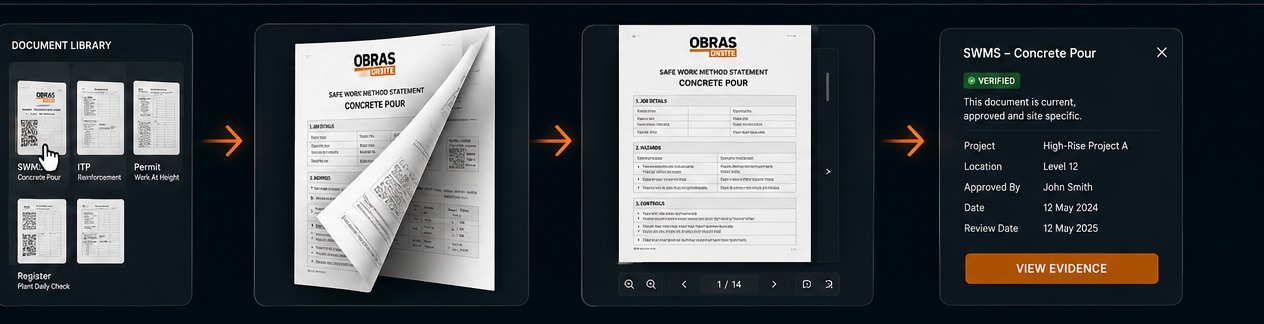
Open it. Preview it. Verify the revision.
Open any document, see how it is built, verify it is the current approved revision.
See the product

Every drawing, every revision, one status

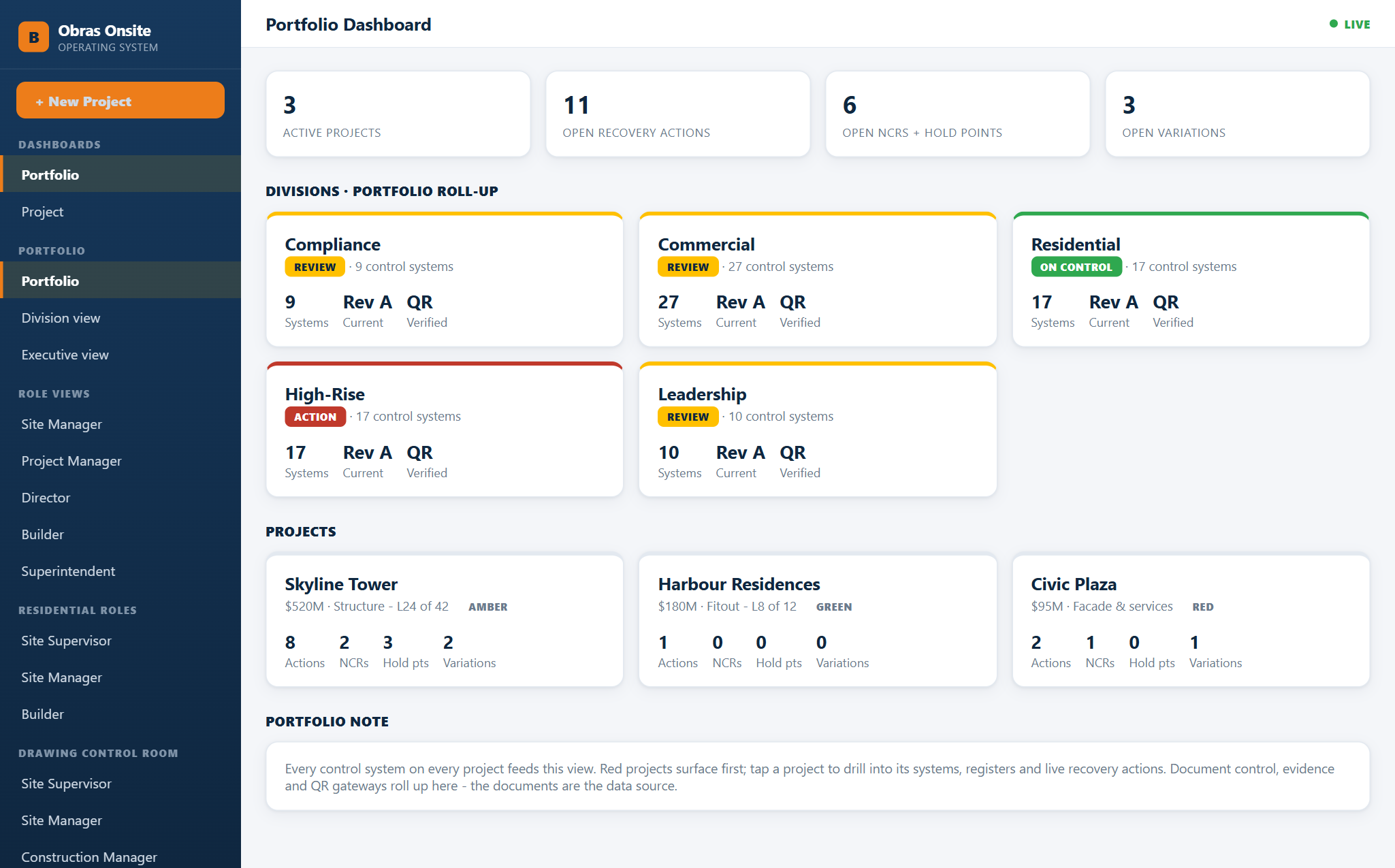
Obras portfolio dashboard showing divisions, projects and open actions
The portfolio dashboard. Demonstration data — project names and counts are illustrative.
Illustrative scenario

The penetration that was set out from a superseded drawing

  1. A drawing is reissued. The copy pinned up in the site office is not.
  2. Every controlled drawing carries a QR band, so the sheet on the wall can be checked against the live record in seconds.
  3. The register shows who holds which revision and who has acknowledged the reissue — so a change is distributed, not just uploaded.
  4. RFIs sit against the drawing they relate to, with the date asked and every chase recorded.

A worked example, not a customer story. It describes how the system behaves, not a result it produced.

What’s included

See it before you buy it

Put your own company name on a controlled document, then issue a revision and watch the QR flip from current to superseded. It runs in your browser and saves nothing.

Open the demo

Common questions

What problem does it solve?

Knowing which revision is the approved one, and proving an RFI was asked and chased on the dates you say it was.

Does it need software?

No. The QR band is a bonus; the documents work on their own.

Can we brand it?

Yes. Editable Word throughout.

Monthly or yearly?

Both. Yearly is cheaper.