Document & RFI Control OS

Never build off a superseded drawing again.

"Am I working from the current approved revision?" — the question behind more rework, defects and disputes than any other on a construction site. The Document & RFI Control OS answers it with a scan: Green current approved, Amber review / pending, Red superseded — do not use. It gives you the Document Control Register, the RFI Register and the RFI Tracker, plus the QR-verify method that rolls every document to one status — so a crew never builds off the wrong sheet.

Current vs Superseded 3 Control Registers QR-Verified Sits under every division
Document & RFI Control OS
$1,999 /year
or $199/month
★ Pay yearly — 2 MONTHS FREE
Get the system → See the system ↓
Annual licence · includes every update for the year
CurrentThe right revision, on the deck
BuiltTo the approved sheet
VerifiedScan to confirm — not superseded
Never build off a superseded drawing — confirmed by scan
📄

The most expensive question on site: "is this the latest revision?"

A wall built off Rev C when Rev D moved the penetration. A slab set out from a superseded sheet. A subbie holding a drawing that was reissued last week and never told. Rework, defects, variations and disputes — the single biggest cause is a crew building off a document that wasn't current. The DDC OS makes the answer instant: scan it, and it's Green current approved or Red superseded — do not use.

How it works

From register to the point of work — one status per document

Every drawing and document registered, revised, transmitted and statused — then verified by scan on the deck, so only the current approved revision gets built.

Stage 1
Register
Stage 2
Revision Control
Stage 3
RFI & Transmittal
Stage 4
Superseded Flag
Stage 5
QR Scan on site
Verdict
Green / Amber / Red
Output
Current at point of work

Register → Revision Control → RFI & Transmittal → Superseded Flag → QR Scan → Green/Amber/Red → Current at the point of work

What you receive

Three control registers + the control-room method

A focused document & RFI control framework — the core registers you actually receive, plus the QR-verify method that proves the current approved revision at the point of work. Not a 30-template drawing-admin dump: the lean spine that keeps one source of truth.

The registers 3

Editable Word + PDF — the documents you receive.
  • Document Control Register
  • RFI Register
  • RFI Tracker

The method

How you run control — not extra files.
  • One status per document
  • Revision & transmittal discipline
  • Superseded sheets pulled

Verification

The status, proven at the point of work.
  • QR Verification
  • Green / Amber / Red Status

Sits under everything

One document spine, every division.
  • Residential
  • Commercial
  • High-Rise
  • Compliance
See the product

This is what the crew scans on the deck

Live control surfaces, not a transmittal folder — the document control register, the scan result, the RFI register and the status verdict.

Document Control Register — Tower A
A-201 Level 20 GARev DCurrent
A-201 Level 20 GARev CSuperseded
S-310 Slab L20Rev BUnder review
A-405 Facade detailRev ECurrent
Superseded still on site1 to pullAction
Document Control Register — every drawing and document, its current revision and status. One source of truth.
QR Gateway — Scan to verify
SCAN
A-201 Level 20 GA — Rev C
Superseded by Rev D on 09 Jun · penetration moved
Red — superseded, do not use
QR Verification — scan the sheet in your hand: current approved, or do not build off it.
RFI Register — Tower A
RFI-088 Penetration clashansweredClosed
RFI-091 Beam size L183 daysOpen
RFI-092 Facade fixingoverdue 6dChase
RFI-093 Set-down detail1 dayOpen
RFI Register — which RFIs are open, which are overdue, which drawings wait on the answer.
Red
Superseded sheet in the field
Document StatusA-201
Current revisionRev D
In handRev C
What changedpenetration
ActionPull & reissue
Green / Amber / Red Status — one status per document, current vs superseded, no ambiguity.

Illustrative control surfaces. Every drawing and document ships QR-verified and ready to brand as your own.

What it helps you achieve

Outcomes, not paperwork

🚫

Never build off superseded

A Red status on a superseded sheet stops the work before the wall goes up or the slab is set out wrong.

📱

Current at the point of work

Scan any drawing or document on the deck and know in a second: current approved, or do not use.

RFIs that don't get lost

Open and overdue RFIs tracked against the drawings waiting on them — chase the answer before it holds the front.

📝

A defensible trail

Every transmittal and revision recorded — who got what, when. The record that settles a dispute in your favour.

🔄

Old revisions pulled

The superseded register flags which old sheets are still in the field and who's holding them — so they get pulled.

🧱

Sits under every division

One document spine beneath Residential, Commercial, High-Rise and Compliance — every division reads the same truth.

At $1,999, it's cheaper than the first wall you don't rebuild.

Building off the wrong revision is the most common — and most avoidable — cost on site.

One element rebuilt

A wall, slab or set-out built off a superseded sheet means demo and rebuild — a single instance dwarfs $1,999.

One revision dispute

"Which revision were you issued?" — a transmittal trail that proves the current revision was issued settles the claim before it starts.

One RFI that held the front

An overdue RFI nobody chased stops a work front for days. Tracked against its drawing, it gets answered in time.

Who it's for

Built for everyone who builds off a drawing

If the wrong revision can cost you, this is your system.

Site Supervisors Site Managers Construction Managers Document Controllers Builders
The depth

What's under the hood

8
Control systems
6
Registers
3
Status states (G/A/R)
5
Divisions it sits under
QR
Verified throughout

This will stop the rework.

Register to the point of work, one status per document, current vs superseded — verified by scan. Built by construction leaders — not consultants.

$1,999 /year · or $199/month
See it in action

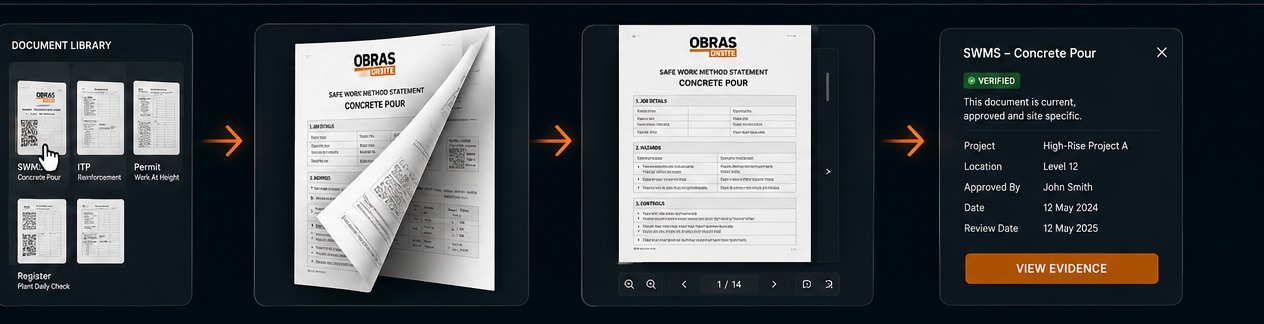
Open it. Preview it. Verify the revision.

Every drawing and document - current, approved and site-specific, proven on the spot.
Open it. Preview it. Verify the revision.
Open any document, preview every page, verify it is the current approved revision.