Residential Operating System · Volume Division

Run 12–20 homes at once — without dropping one.

PHASE 2 — PREPARED: being stamped to the controlled Obras standard; not yet on sale. The specification below is the system as designed.

The complete residential division — Site Supervisor, Site Manager, Builder and the Townhouse Delivery System — in one QR-verified control environment. Across every home: which one moves a stage today, which one's slipping, and the single move that holds it. Each rolled to one verdict: Green on programme, Amber slipping, Red action required.

Volume Division 4 Role Packs · 32 Systems QR-Verified Sits above your stack
Residential OS licence
$2,999 /year
or $299/month
Phase 2 — prepared, not yet on sale · Notify me See the system ↓
Annual licence · includes every update for the year
BuildSlab, frame & lock-up
VerifyStage sign-off by scan
HandoverPCI, quality & defects
12–20 homes at once — every stage on programme
🏠

In volume housing, the job isn't one build. It's twenty — each at a different stage.

Lot 14 is waiting on a frame inspection. Lot 22's slab pour slipped and no one moved the trades. A client variation on Lot 9 never got signed — you'll wear it. A defect on Lot 31 is about to be plastered over. Across 20 homes the picture lives in a supervisor's head and a whiteboard — and the one that slips is the one you find out about late. The Residential OS puts every home on one board and tells you the move that holds the programme today.

How it works

Every home, every role — one operating system

Supervisor, Manager and Builder each run their loop; the OS rolls all of them to one verdict per home and one view across the portfolio.

Daily
Site Supervisor
Weekly
Programme & Cost
Portfolio
Builder Oversight
Stage
Per-Home Dashboard
Verdict
Green / Amber / Red
Output
Client Reporting

Site Supervisor → Programme & Cost → Builder Oversight → Per-Home Dashboard → Green/Amber/Red → Client Reporting

What you receive

4 role packs — 32 control systems, every one named

Not "a residential bundle". The four role packs that run volume housing, each a complete operating loop.

Site Supervisor 8

The daily run across 12–20 homes.
  • Daily Site Control
  • Trade Coordination
  • Delivery Management
  • Defect Management
  • SWMS & Compliance
  • Client Variations
  • Quality Inspections
  • Handover Readiness

Site Manager 8

Every home on programme and making its margin.
  • Programme Control
  • Procurement Control
  • Cost Tracking
  • Trade Performance
  • Variations
  • Client Reporting
  • Defect Close-Out
  • Handover Control

Builder 8

The whole book — multi-site oversight and the business.
  • Multi-Site Oversight
  • Builder Dashboard
  • Procurement Forecasting
  • Cashflow Visibility
  • Pipeline Management
  • Contract Management
  • Builder Risk Register
  • Business Performance Controls

Townhouse Delivery 8

Sequence every block slab-to-occupancy.
  • Multi-Stage Sequencing
  • Slab-to-Frame Controls
  • Services Coordination
  • Procurement Tracking
  • Defect Management
  • Occupancy Readiness
  • Staged Handover Controls
  • Programme Recovery
See the product

This is what the supervisor runs the run from

Live control surfaces, not a spreadsheet — the multi-home board, a stage-claim register and the verdict. Scanning a document’s QR confirms its revision and controlled status.

Estate Board — Parkridge (18 homes)
11
On programme
5
Slipping
2
Action today
3
Handover-ready
Lot 14 — frameinspection dueAmber
Lot 22 — slabpour slippedRed
Lot 31 — lock-upon programmeGreen
Estate Board — every home, its stage and one verdict. The move that holds the programme.
Variations & Stage Claims — Lot 9
Slab claim$42,000Claimed
Client variation — kitchen$8,600Unsigned
Frame claim$38,500Due
At risk if unsigned$8,600Action
Variations & Stage Claims — claim every stage, sign every variation, across every home.
QR Gateway — Scan to verify
SCAN
Lot 14 — Working Drawings
Rev 3 · current approved · frame inspection ready
Green — current approved
QR Verification — scan the home file or drawing on site: current approved, or superseded.
Amber
2 homes need a move today
Daily Run06:30
Lot 22 slabBook pump
Lot 14 frameCall inspector
Lot 9 variationGet signed
Homes handover-ready3
Green / Amber / Red + Daily Run — the moves that hold the programme, every morning.

Illustrative control surfaces. Every register and dashboard ships QR-verified and ready to brand as your own.

What it helps you achieve

Outcomes, not paperwork

🏠

Every home on programme

One board across 12–20 homes — see the home that's slipping and the move that holds the whole estate's programme.

💰

Claim every stage

Slab, frame, lock-up, fix, completion — every stage claim tracked and lodged. Cashflow protected across the book.

✏️

Sign every variation

Client variations captured and signed before the work's done — not absorbed silently across twenty jobs.

🔎

No defect buried

Defects logged and closed before the next trade covers them — caught at inspection, not at the final walk-through.

📊

Multi-site visibility

The builder's view across every estate — programme, cashflow, pipeline and risk on one dashboard.

🤝

Client confidence

Clean, consistent client reporting on every home — the same standard whichever supervisor runs the site.

At $2,999 across a book of 20 homes, it pays for itself on one.

In volume housing the leaks are small and constant — and they add up across the estate.

One unsigned variation

An unsigned client variation you end up wearing — even a small one — across a book of homes adds up fast. Capture them and the OS has paid for itself.

One home slipping a stage

A slab pour missed and trades stood down ripples through the programme. Holding the date on one home covers the licence.

One defect at handover

A defect found at the final walk-through — rework, re-trade, an unhappy client — costs far more than catching it at inspection.

Who it's for

Built for volume housing

If you're running a book of homes, this is your system.

Residential Supervisors Site Managers Volume Builders Project Managers Contract Administrators
The depth

What's under the hood

32
Control systems
4
Role packs
5
Build stages tracked
20
Homes on one board
QR
Verified throughout

This will run your homes.

Supervisor to builder, every home on one operating system, one verdict each — every document QR-verified for its revision and controlled status. Written on site, not in an office.

$2,999 /year · or $299/month
See it in action

Scan it. Verify it. Control it.

Every residential document, permit and check connects to one live system.
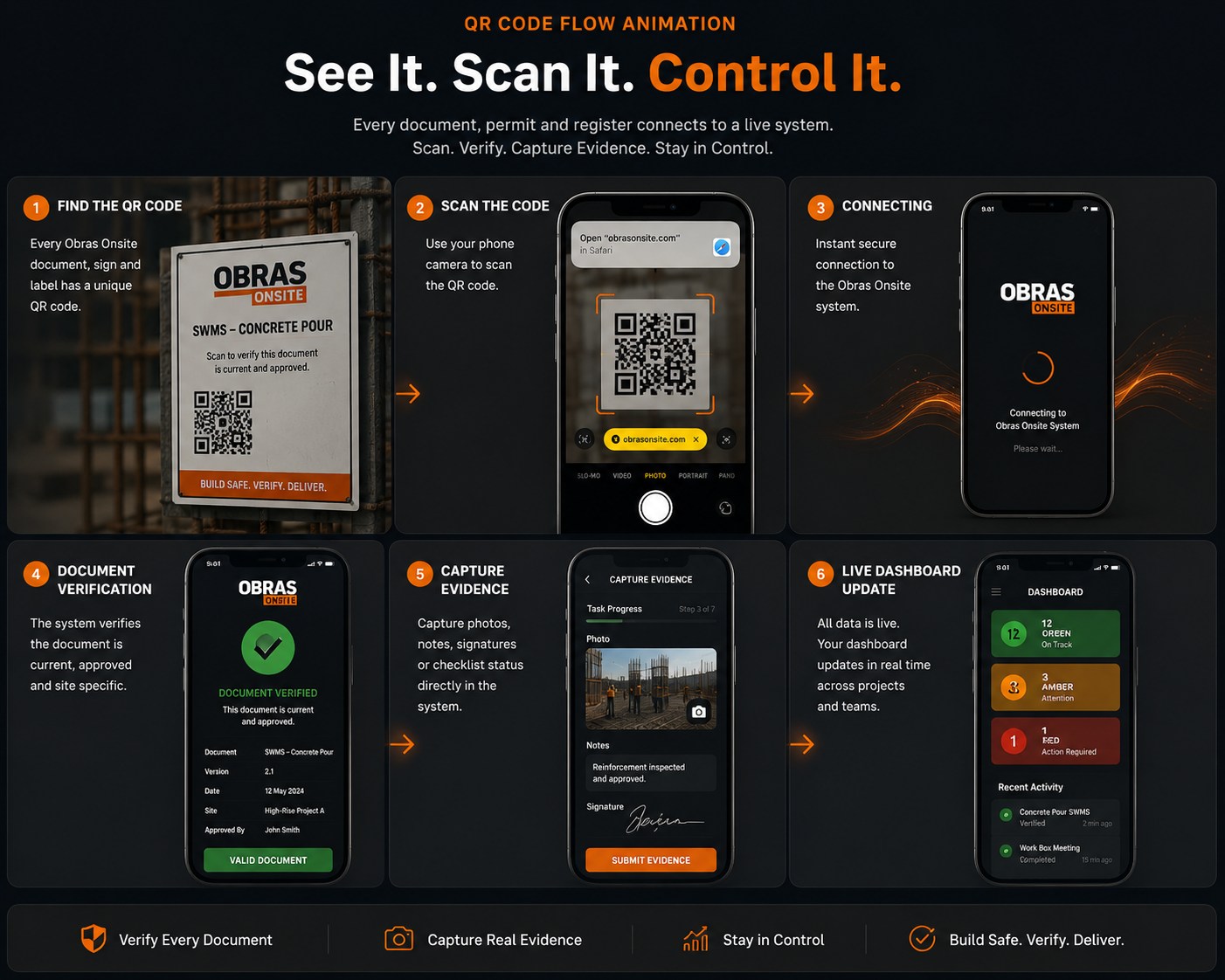
Scan it. Verify it. Control it.
One QR - from the printed page to the document’s revision and current controlled status.
See the product

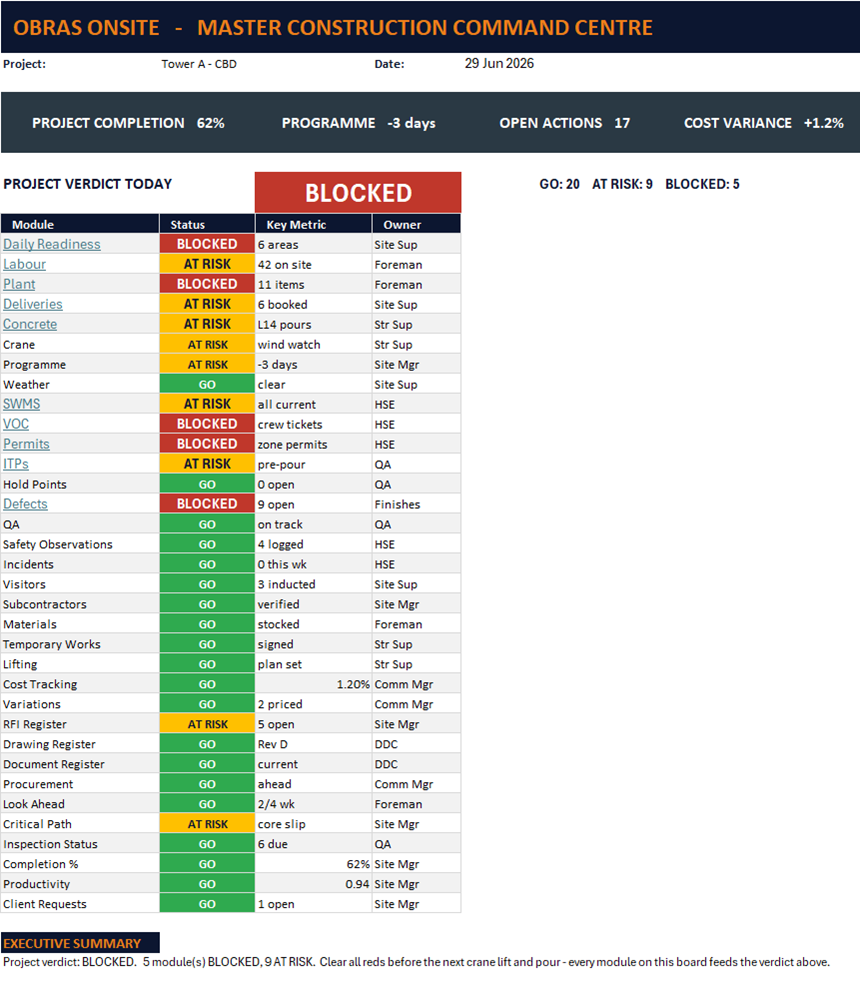
Two hundred units, one page

The Obras Command Centre workbook showing modules and a Green, Amber, Red verdict
The Command Centre. Demonstration data — module figures are illustrative.
Illustrative scenario

Fit-out, 6:00am — which units can the trades start on?

  1. Nobody can hold two hundred units in their head, so the answer usually comes from three phone calls and a walk.
  2. The readiness board carries every unit against its stage — slab, frame, lock-up, fix, PCI — and what each one is waiting on.
  3. Trades get booked onto fronts that are actually ready, instead of turning up to a unit that is still waiting on a plumber.
  4. At handover, the defects and PCI records already exist, because they were captured as the job ran rather than assembled at the end.

A worked example, not a customer story. It describes how the system behaves, not a result it produced.

What’s included

See it before you buy it

Put your own company name on a controlled document, then issue a revision and watch the QR flip from current to superseded. It runs in your browser and saves nothing.

Open the demo

Common questions

Is it too much for one house?

It is sized for residential work rather than cut down from commercial. The sequencing and handover documents earn their keep on a single job.

Does it include SWMS?

Trade SWMS come from the SWMS library. This is the builder-side paperwork around them.

Can I edit it?

Yes, Word and PDF for every document.

Monthly or yearly?

Both. Yearly is cheaper.